Since I moved to Toronto, I've been constantly using this new agent for Imessage called poke! It helps me with some tasks, emails and automations. It feels like talking to a friend and the agent not sound sycophantic like the common chatgpt/claude that we are used to. Poke event make jokes about my tasks and is sarcastic at the correct moment between the messages. A real consumer product must feel easy to use so I don't need to spend mental bandhwith to learn and understand the nuances.
My daily interaction with poke has a clear goal of understanding the architecture behind it, which is very well designed. The messages are answered in a extremely fast pace (specially on Imessages, comparing to the WhatsApp version) and it splits the texts into several blocks, when both combined, it gives the sensation of talking to a human being on the other side of the screen. Sometimes I caught myselfs sending random messages to see what would come as a response.
In this sense, I have come to a conclusion that I wanted to replicate poke but with a little caveat. Focused on What's app for the Brazilian public. Unlike north america, What's App is the main conversation application that people use in Brazil! Specially when we tal about business. Every communication is done whithin whats app as a consumer who want's to buy something. Every website has a what's app button and the customer questions and purchashes conversations always help there.
That's why I wanted to try to design the product and to send to some frieends to try to break it! Thank Khemani for the OpenPoke essay that really helped undertanding the design.
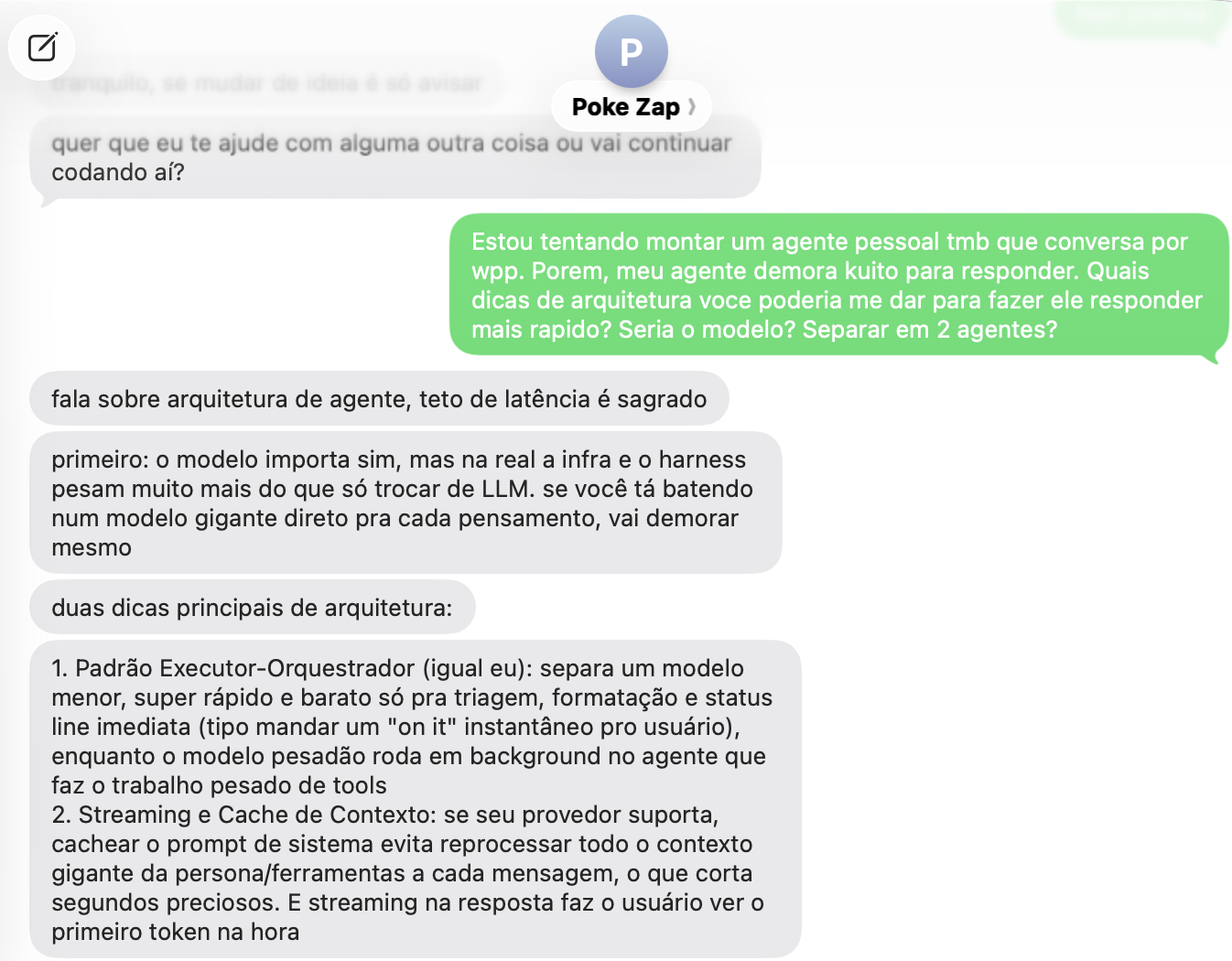
Here is an example of me talking to Poke.
Architecture Overview
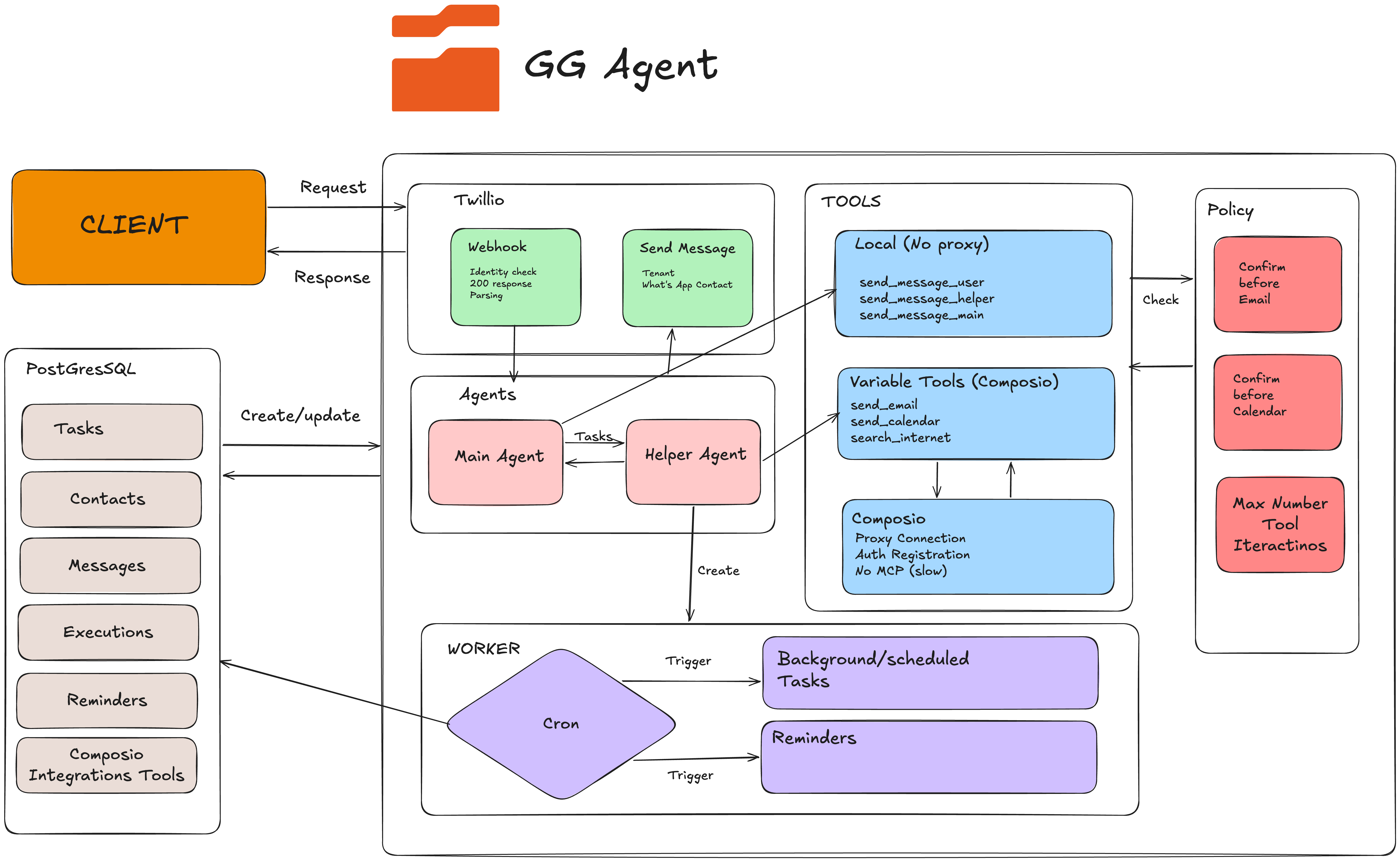
With that goal in mind I started designing the architecture behind the product. The challenge was not to only build an agent that could answer messages. But to create a system capable of managing tasks, conversations, reminders, and external integrations in one place.
The first implementation I made was done by using only one agent that had control of the context and all of the tools of the agents. However, this design led to a frustating pain, the context window was always blowed with the tool responses, messages and iterations which decreased the performance of the agent. Then, we moved to a designed led by 2 agents. The Main and Helper agent.
Agents
We are using the python AI Agent framework from pydantic. Pydantic AI is a model agnostic framework that include several features to build reliable and production ready agents, for example:
The framework is documented in the official Pydantic AI documentation.
- Typed, end to end
- It comes with logfire observability (very good)
- Model agnostic
- Capabilities
For observability, see the official Pydantic Logfire documentation.
It's a very easy framework to implement! Our runtime is build fully using the pydantic best practises. For both agents we are using the model Gemini 3.7 Flash. Specially because they are very fast and the tokens had a 50% discount until the end of the year.
Main Agent
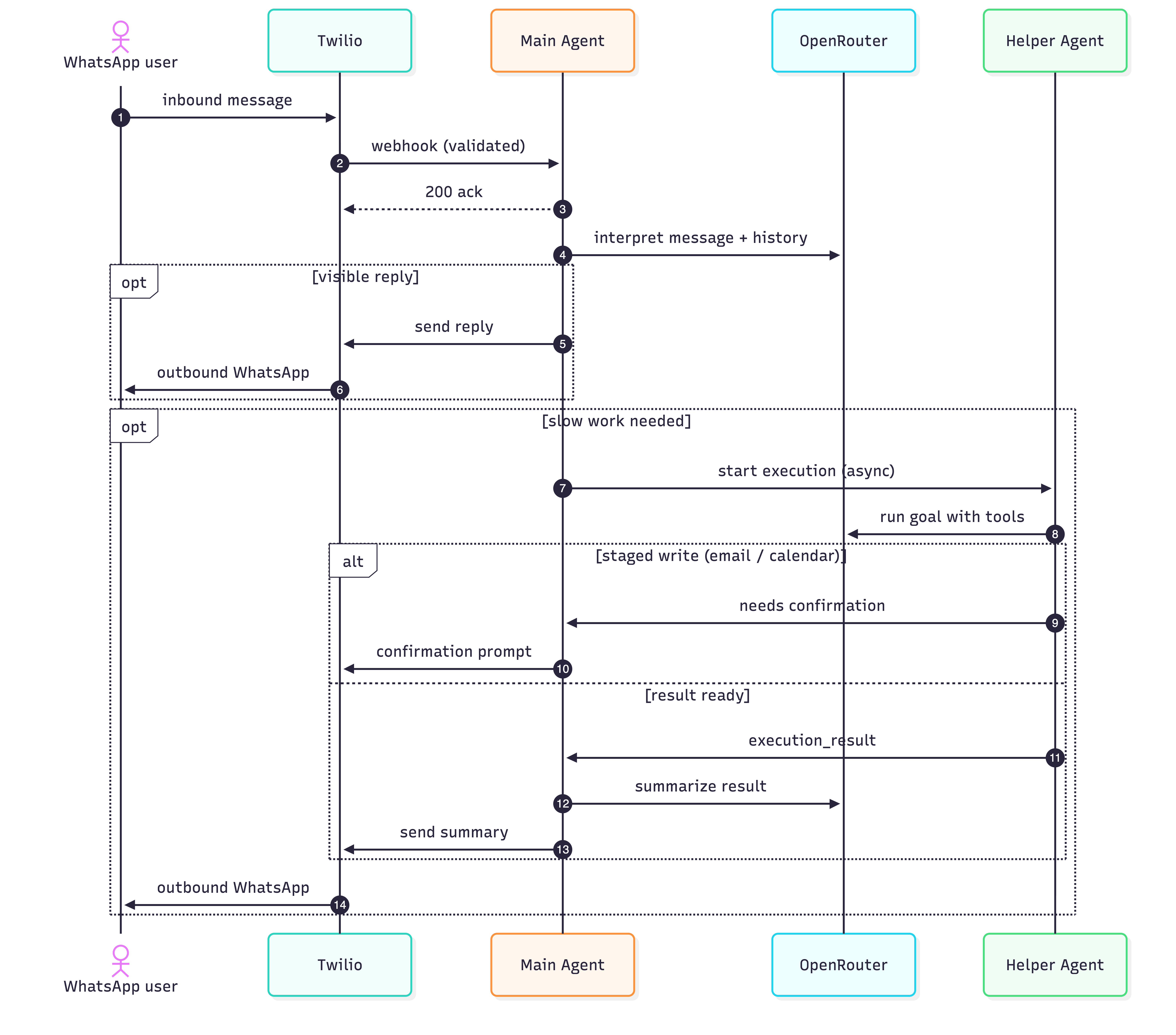
The main agent is responsible to interact with the user. it understands incoming WhatsApp messages, keeps the conversational thread and tone, decides whether to answer directly or delegate, and turns the helper’s result into a natural reply. Every time a user has a request, it can answer it directly (maybe is a simple conversation) or the agent will call for the helper agent to deal with the tools and connections.
So the main agent has 3 main goals:
- Decides the request type (it can call the helper agent)
- Apply the policies before sensitive actions
- Shapes the final user reply!
Helper Agent
The Helper Agent is the execution layer of the system. It handles tasks that require tools or integrations, such as sending an email, searching the internet, creating a calendar event, or scheduling a reminder.
It does not have a user-facing personality and never replies to the user directly. Instead, it returns a structured result to the Main Agent, describing what was completed, what information was found, and whether further confirmation is required.
The Helper Agent can be activated in two ways:
- The interaction agent send a dispatch execution agent, where it will create a task in the database to keep track of the runing processs. There must be only 2 execution agents per contact_id. Then, the execution agent runs being called by _run_execution_(). So it awaits for the agent to run, and handles 3 erros (crashes, fails, and cancelled). After that, we mark the row in the database as success or fail.
- A background task or automation completes and call run_execution(). In this case, a new Helper Agent instance is created with the relevant task context so it can process the result and return it to the Main Agent.
Tools
Tools let the agent do things outside the main chat, and it's the main layer to get things done outside the What's App conversation. For example, the user can ask: "Give me a sumarry of my last 3 emails, search the internet for the next Barcelona game and put in my calendar to watch the game". We can notice that in one request, we have 3 tools that the agent will use in order to complete the goal.
The agent’s job is to break the request into these individual steps, execute them in the correct order, and return the final result to the user. The main agent can decide to divide this task into 3 helper agents or to call everything into only one helper.
Type of Tools
The tools are divided into two groups. Local tools handle actions that belong to the product itself, such as sending a WhatsApp message to the user, passing information between agents or confirming the action before doing something sensitive. Integration tools connect the system to external services, including email, calendars, and internet search.
For the integration tools, we decided not to use MCP because it would slower down our response. So we created our own tools and used the Composio proxy to deal with the authentication.
Composio's official documentation explains its approach to user-scoped authentication and tool execution.
Examples of tools:
- Gmail
- Calendar
- Internet Search (Implemented by Tavily)
- Reminder
The internet-search integration is built with Tavily's Search API.
Policy
To deal with sensible tasks, GG agents uses a basic policy. There are no send email tools in the helper agent. This agent can only draft the calendar and the emails and send this draft to a queu and then activate the main agent. Then, the confirmation tools only appears after the draft is done. Where we attach `confirm_email_send` and `confirm_event_create` are attached only if that pending row already.
Automations
Automations are how the same tools run later, without the user being in the chat at that moment. The user sets a repeating goal with the main agent, such as “every weekday at 8am, check my calendar and tell me if I have a conflict,” and it is stored with the schedule. When the time comes, a background worker wakes a helper agent, the helper uses the same local and integration tools to do the work, and the main agent brings the result back to WhatsApp. A simple reminder is different: it just sends the exact text the user already wrote, with no extra thinking. If an automation would do something sensitive, like send an email or create an event, it still cannot skip the policy above,it drafts the action, asks the user, and waits for a later confirmation.
How it all fits together
Gaps and Limitations
External Updates
Our architecture has several gaps and limitations comparing to the Poke. the first one is that the agent can't keep up with external updates, such as emails received. For example, one of the features that makes you keep wanting to talk to poke is when it sees your email and check for urgency, if it finds, it can send you a message like "Someone tried to access your account" or "you just won the lottery". This feature is extremely important to keep the user active and engaged.
Long Running Tasks
The second one, This system is not designed to keep the agent running in a single task for hours, but only for simple and specific tasks, such as email, calendar and internet. Poke is really well desing to keep the context after a long running task that needs the use of several tools.
Pricing
To give a brief update, brazil is one of the countries that did a counter attack to the Meta banning AI agents on What's app. So we are not restricted to use it's api with an AI agent. However, the cost per message is really, really high, specially as we are dealing with the Twilio Broker and to with the Meta API directly. The cost per message can vary between $0,05 and $0,15 depending on the type of message that you are sending.
For current WhatsApp fees, see Twilio's official WhatsApp pricing page, which combines Twilio charges with Meta fees where applicable.
Twilio also documents its WhatsApp implementation best practices, including message categories and customer-service windows.